


Understanding what are core web vitals and why are they important is the single most critical step toward securing top rankings in modern search results. Core Web Vitals are three real-world speed and visual stability metrics that Google uses to evaluate overall user experience. If your site feels slow or jumps around while loading, visitors leave instantly.
To fix poor performance, you can get professional help through our tailored technical SEO services.
Google created Web Vitals to provide unified guidance for quality signals on the web. Rather than looking at abstract server speeds, these metrics focus on real human interaction. They evaluate how fast main content loads, how quickly the page responds to user clicks, and whether layout shifts disrupt reading.
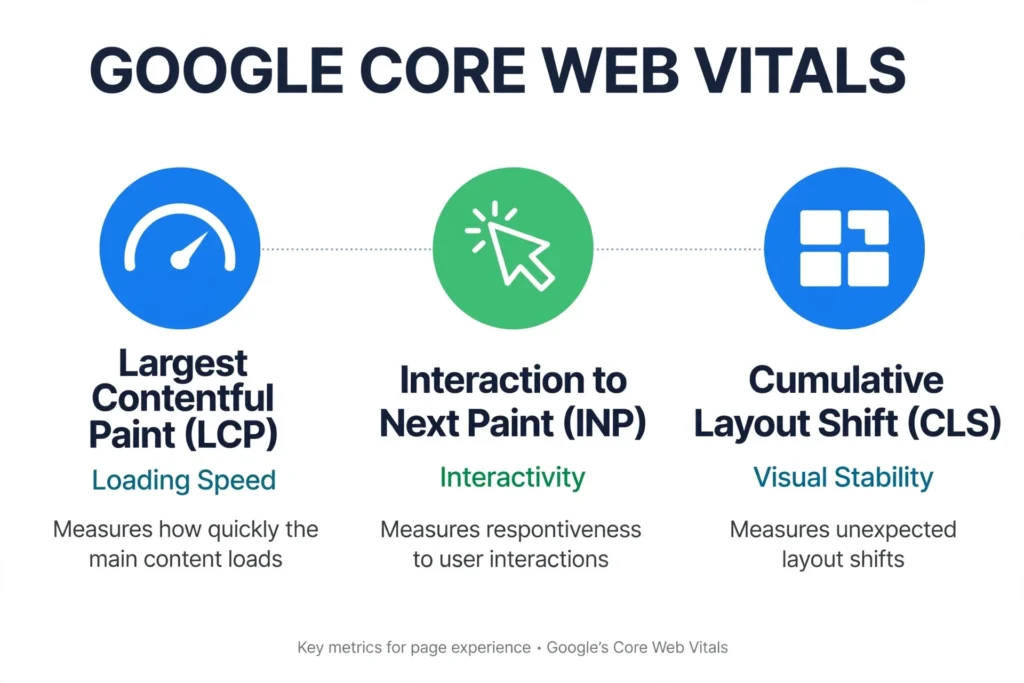
+-----------------------------------------------------------------------+
|                        GOOGLE CORE WEB VITALS                         |
+------------------------------+-------------------------+--------------+
|   Largest Contentful Paint   | Interaction to Next     | Cumulative   |
|            (LCP)             |       Paint (INP)       | Layout Shift |
|                              |                         |    (CLS)     |
+------------------------------+-------------------------+--------------+
|       LOADING SPEED          |      INTERACTIVITY      |  VISUAL      |
|                              |                         |  STABILITY   |
+------------------------------+-------------------------+--------------+
What Are Core Web Vitals? (The Baseline Definition)
Core Web Vitals are a standardized set of performance metrics created by Google to measure the user experience of a web page. They apply to every public web page and are measured using actual field data collected from Chrome browsers worldwide.
Google updates these metrics over time. For instance, Google permanently replaced First Input Delay (FID) with Interaction to Next Paint (INP) to measure site responsiveness more accurately.
The three Core Web Vitals components are:
- Largest Contentful Paint (LCP): Measures perceived loading speed by timing when the main content finishes rendering.
- Interaction to Next Paint (INP): Measures overall page responsiveness during user clicks, taps, or keypresses.
- Cumulative Layout Shift (CLS): Measures visual stability by tracking unexpected page layout jumps.
The 3 Essential Core Web Vitals Metrics
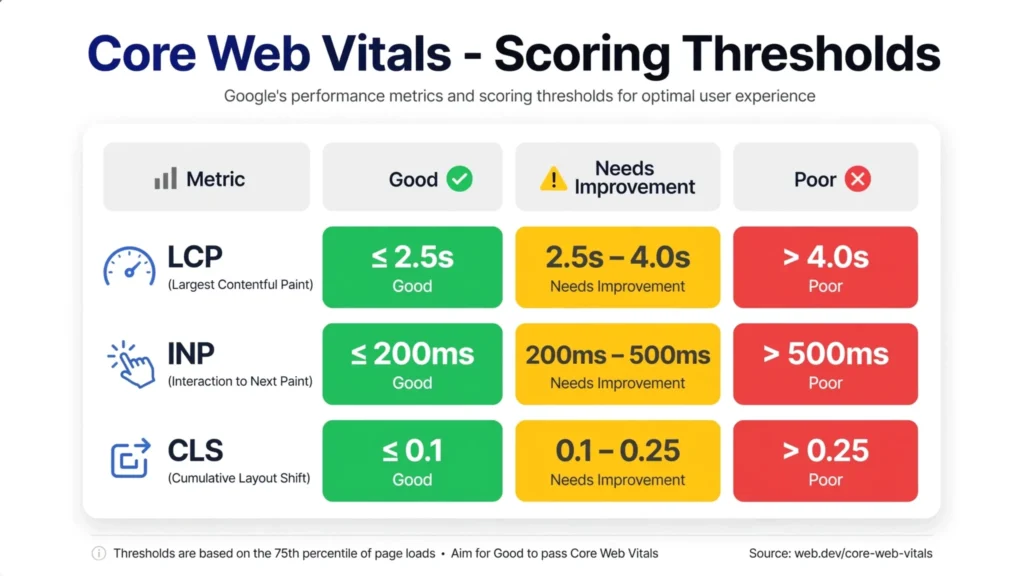
To pass Google’s assessment, a page must reach the Good threshold for all three metrics at the 75th percentile of user visits.
1. Largest Contentful Paint (LCP)
LCP marks the point in the page load timeline when the main content has likely loaded. This main content is usually a hero image, a featured banner, or a large text heading.
- Good: Under 2.5 seconds.
- Needs Improvement: Between 2.5 and 4.0 seconds.
- Poor: Greater than 4.0 seconds.
Slow LCP usually stems from unoptimized hero images, slow server response times (TTFB), and render-blocking CSS or JavaScript.
2. Interaction to Next Paint (INP)
INP measures page responsiveness. It logs the latency of all qualified user interactions (like clicking a button or opening a menu) throughout a user’s entire visit, reporting a single value that represents overall input delay.
- Good: 200 milliseconds or less.
- Needs Improvement: Between 200 ms and 500 ms.
- Poor: Greater than 500 ms.
Poor INP happens when heavy JavaScript monopolizes the main browser thread, preventing the browser from rendering visual feedback after a click.
3. Cumulative Layout Shift (CLS)
CLS measures visual stability. You have probably experienced reading an article when suddenly an ad loads, shifting the text downward and causing you to tap the wrong link. CLS calculates a score based on how much elements move relative to the viewport.
- Good: 0.1 or less.
- Needs Improvement: Between 0.1 and 0.25.
- Poor: Greater than 0.25.
Common causes include images without defined width and height dimensions, dynamic ad banners, or custom web fonts swapping late.
Performance Thresholds Comparison Table
| Metric | Focus Area | Good (Pass) | Needs Improvement | Poor | Primary Culprit |
| LCP | Loading Speed | $\le$ 2.5s | 2.5s – 4.0s | $> 4.0\text{s}$ | Large images & slow servers |
| INP | Responsiveness | $\le$ 200ms | 200ms – 500ms | $> 500\text{ms}$ | Heavy JavaScript execution |
| CLS | Visual Stability | $\le$ 0.1 | 0.1 – 0.25 | $> 0.25$ | Images/Ads without dimensions |
Field Data (CrUX) vs. Lab Data (Lighthouse)
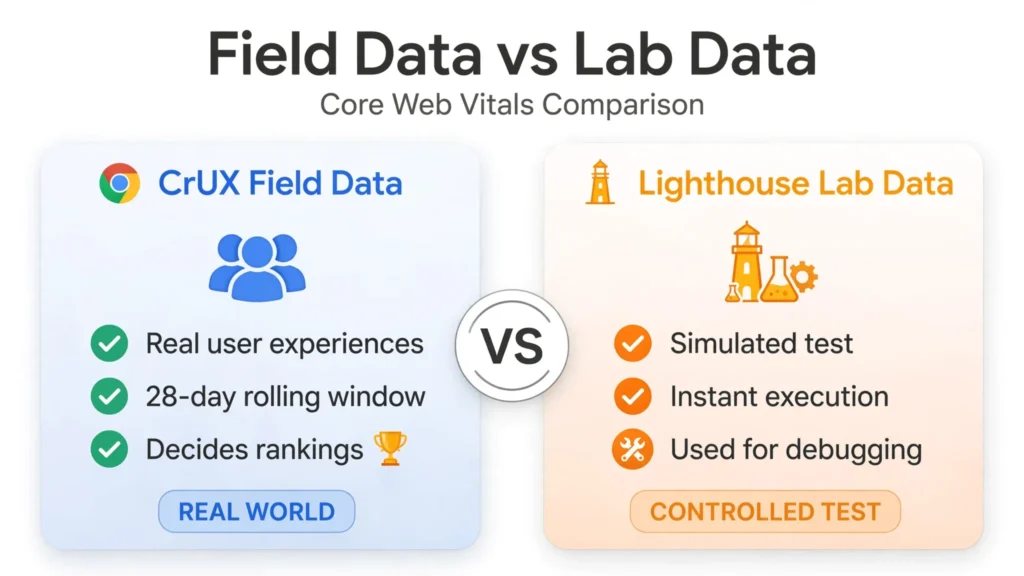
A major source of confusion is the difference between Field Data and Lab Data.
+----------------------------------------------------------------+
|                   FIELD DATA vs. LAB DATA                      |
+--------------------------------+-------------------------------+
|      CrUX (FIELD DATA)         |     LIGHTHOUSE (LAB DATA)     |
| Real user experiences          | Simulated test run            |
| 28-day rolling window          | Instant execution             |
| Decides search rankings        | Used for debugging            |
+--------------------------------+-------------------------------+
Chrome User Experience Report (CrUX)
Field data represents actual visitors navigating your site on diverse mobile networks, entry-level smartphones, and desktop systems. Google pulls this information into the Chrome User Experience Report (CrUX) over a rolling 28-day collection window.
Google rankings depend strictly on CrUX field data.
Synthetic Testing (Lighthouse)
Lab data comes from tools like Google Lighthouse. Lighthouse simulates a single test run using a pre-configured device speed and network throttling profile. Lab tools are great for debugging issues before deploying code, but scoring 100 on Lighthouse does not guarantee passing Core Web Vitals if your real users face network delays or slow devices.
How Core Web Vitals Affect SEO and Conversions in 2026
Are Core Web Vitals a ranking factor? Yes, absolutely. They serve as official page experience signals within Google’s core ranking system.
       +--------------------------------------------------+
       |             SEARCH ENGINE RANKINGS               |
       +--------------------------------------------------+
                                ^
                                |
             +------------------+------------------+
             |                                     |
    +-----------------+                  +-------------------+
    | RELEVANCE &     |                  | PAGE EXPERIENCE   |
    | CONTENT QUALITY |                  | CORE WEB VITALS   |
    +-----------------+                  +-------------------+
The SEO Impact
When two websites compete with equally high-quality content and authoritative backlinks, Google relies on page experience to break the tie. A site that fails the Core Web Vitals assessment risks losing top positions to faster competitors.
The Conversion Impact
Performance directly affects revenue. Industry studies show that:
- Over 53% of mobile users abandon sites taking longer than 3 seconds to load.
- Every 100ms delay in page load can drop conversion rates by up to 7%.
- Fixing visual shifts (CLS) reduces accidental click-outs and lowers overall cart abandonment rates on e-commerce sites.
Why Core Web Vitals Matter for AI Overviews and ChatGPT Search
Search habits have shifted drastically toward generative search engines. AI platforms like Google AI Overviews, ChatGPT Search, Gemini, and Perplexity fetch data directly from web pages to construct real-time answers.
[ AI Web Crawler / Search Engine ]
               │
               ▼
     ┌──────────────────┐
     │  Fast Page Load  │ ──► [ Instant Scraping & Citation ]
     └──────────────────┘
               │
               ▼
     ┌──────────────────┐
     │ Slow / Heavy Site│ ──► [ Connection Timeout / Omitted ]
     └──────────────────┘
When an AI engine processes queries, its web crawlers need rapid access to content. If a website takes several seconds to parse JavaScript or execute render-blocking elements, AI bots may skip parsing the page or time out.
Optimizing for Core Web Vitals ensures that web crawlers can read, process, and cite your content within automated generative answers.
How to Check Core Web Vitals of a Website
Diagnosing performance issues is straightforward with the right diagnostic workflow.
Step 1: Check Google Search Console (GSC)
Log into Google Search Console and open the Core Web Vitals tab under the Experience menu. GSC groups your indexed URLs into “Good”, “Needs Improvement”, or “Poor” buckets based on real-world CrUX data.
Step 2: Test URLs in PageSpeed Insights
Copy failing URLs from GSC and run them through PageSpeed Insights (PSI). PSI shows real field data from actual users at the top and provides synthetic lab diagnostic data below.
Step 3: Utilize Developer Tools
Use the Chrome DevTools Performance tab to profile long tasks, identify main-thread blocking scripts, and trace visual layout shifts frame by frame.
How to Fix Core Web Vitals Across WordPress, Shopify, and Next.js
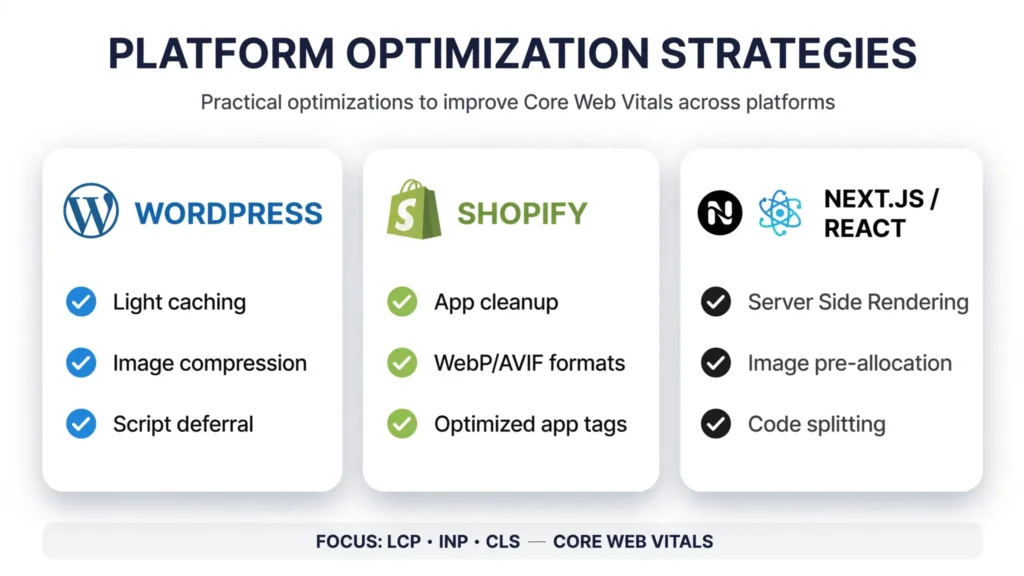
Fixing performance issues requires targeted optimizations for your specific platform.
+----------------------------------------------------------------------+
|                 PLATFORM OPTIMIZATION STRATEGIES                     |
+-------------------+--------------------+-----------------------------+
|     WORDPRESS     |      SHOPIFY       |       NEXT.JS / REACT       |
| Light caching     | App cleanup        | Server Side Rendering (SSR) |
| Image compression | WebP/AVIF formats  | Image pre-allocation        |
| Script deferral   | Optimized app tags | Code splitting (dynamic)    |
+-------------------+--------------------+-----------------------------+
1. WordPress Optimization
- Optimize Images: Convert JPEGs to modern formats like WebP or AVIF using plugins like ShortPixel or Imagify. Set explicit
widthandheightattributes on image tags to eliminate CLS. - Manage JavaScript: Use caching plugins (such as WP Rocket or FlyingPress) to defer non-essential scripts and remove unused CSS.
- Preload LCP Assets: Preload main hero images or primary font files in your HTML header using
<link rel="preload">tags.
2. Shopify Optimization
- Audit Store Apps: Third-party apps frequently inject heavy JavaScript onto every page, hurting your INP score. Uninstall unused apps to clean up leftover script tags.
- Lazy Load Below-the-Fold Images: Ensure product gallery thumbnails and lower section images use native
loading="lazy"attributes, while removing lazy loading from the primary product hero image.
3. Next.js & Custom React Applications
- Use
next/image: The built-in Next.js Image component automatically resizes images, converts them to modern WebP/AVIF formats, and prevents visual layout shifts by reserving aspect ratio space automatically. - Dynamic Imports: Break up massive JavaScript bundles using
next/dynamicto load heavy UI components only when users interact with them, keeping the main thread clear for low INP.
Core Web Vitals Optimization Checklist
Use this practical checklist to quickly verify and track your performance fixes:
- [ ] LCP Fix: Compress all hero and banner images to under 150KB.
- [ ] LCP Fix: Preload the main hero image in the header tag.
- [ ] LCP Fix: Implement server-level caching or a CDN (Cloudflare) to bring TTFB under 600ms.
- [ ] INP Fix: Defer non-critical scripts (Google Tag Manager, analytics, chat widgets).
- [ ] INP Fix: Split long-running JavaScript tasks into smaller chunks under 50ms.
- [ ] CLS Fix: Reserve explicit width and height attributes on all image and iframe elements.
- [ ] CLS Fix: Set CSS
font-display: swapor preload key custom web fonts. - [ ] CLS Fix: Reserve fixed structural container dimensions for dynamic banner ads.
Common Core Web Vitals Mistakes to Avoid
- Relying Only on Lighthouse Scores: Optimizing solely for Lighthouse green scores while ignoring real mobile field traffic in GSC.
- Lazy Loading Hero Images: Adding
loading="lazy"to the LCP hero image delays its rendering significantly. - Overusing Third-Party Widgets: Adding multiple tracking pixels, live chat tools, and review widgets causes long JavaScript tasks that ruin your INP score.
- Ignoring Mobile Performance: Testing speeds on high-speed desktop connections rather than throttled mobile networks, where over 60% of search traffic originates.
Frequently Asked Questions (FAQs)
Are Core Web Vitals a ranking factor?
Yes, Core Web Vitals are official Google search ranking factors. They serve as key page experience signals that help Google evaluate how real visitors interact with a site. Sites that deliver fast, stable loading speeds gain a competitive advantage in organic search results.
How do you improve Core Web Vitals?
Improving Core Web Vitals involves optimizing images into modern formats like WebP, defining explicit width and height dimensions to prevent layout shifts, deferring non-essential JavaScript, and utilizing fast server caching or content delivery networks (CDNs).
What is LCP in Core Web Vitals?
Largest Contentful Paint (LCP) measures how long it takes for the largest visible element—such as a hero image, video thumbnail, or main text heading—to finish rendering on the user’s screen. A good LCP score is 2.5 seconds or less.
What is INP in Core Web Vitals?
Interaction to Next Paint (INP) assesses overall page responsiveness by measuring the time between a user clicking, tapping, or pressing a key and the browser displaying updated visual feedback. A good INP target is 200 milliseconds or less.
What is CLS in Core Web Vitals?
Cumulative Layout Shift (CLS) measures visual stability by calculating the frequency and distance of unexpected content layout jumps during the page load process. Maintaining a CLS score of 0.1 or lower ensures a smooth browsing experience.
Final Verdict: Passing the Assessment
Understanding what are core web vitals and why are they important is essential for maintaining high visibility and strong conversion rates. Core Web Vitals bridge the gap between technical site architecture and real human user experience. By measuring LCP, INP, and CLS through real-world field data, Google ensures that high-ranking sites perform quickly and reliably.
Start by auditing your pages in Google Search Console today. Focus on high-traffic pages first, resolve image sizing issues, clean up unnecessary scripts, and deliver the fast experience your visitors expect.