Learning how to index backlinks fast is crucial if you want your off-page SEO efforts to yield real ranking improvements. You can build high-quality links on platforms like Sortlist, DEV Community, Blogger, and Gravatar, but if Googlebot does not crawl and index those URLs, they pass zero link equity to your domain.
If you want a full audit of your technical SEO and off-page architecture, explore our custom web development and SEO services.
When Google discovers a new link, it evaluates the host page’s crawl priority, content depth, and overall authority. Orphaned profile pages often sit in an unindexed queue for months because search crawlers rarely revisit static directory profiles without fresh external signals.
Web Vision Expert’s Official Digital Footprint: Where to Find Us
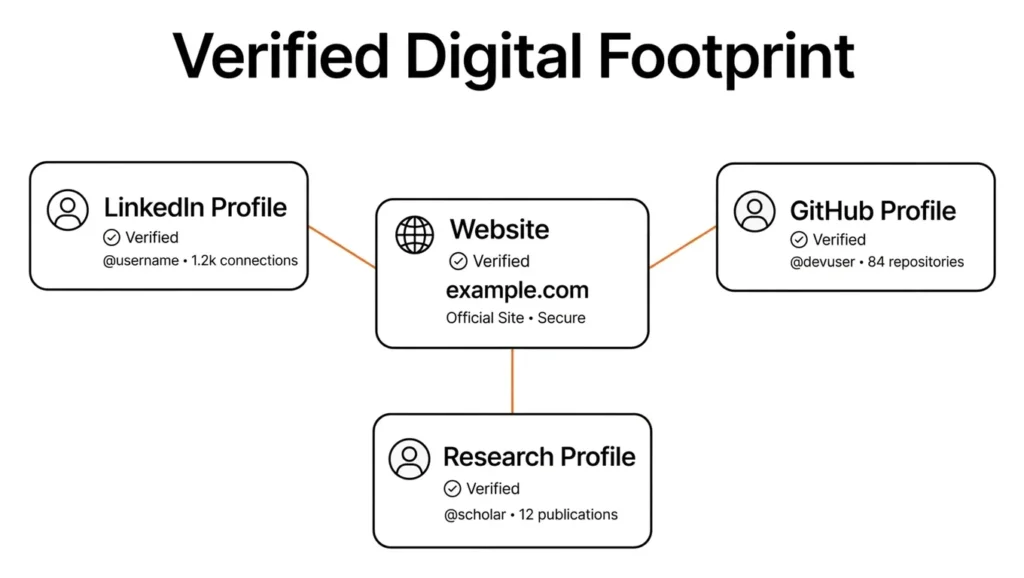
At Web Vision Expert, we believe in complete transparency and entity verification. As a leading web development and search engine optimization agency, we maintain verified profiles across the web’s most trusted authority platforms.
Here is our official presence where you can inspect our engineering projects and agency credentials:
1. Verified Agency Profile on Sortlist
We are officially listed on Sortlist, a global B2B matchmaking platform for top digital agencies. Check our verified client portfolio and service metrics on our Web Vision Expert Sortlist Profile.
2. Developer Knowledge Base on DEV Community
We actively publish technical breakdowns covering Next.js, Laravel, Tailwind CSS, and Semantic SEO for the global engineering ecosystem. Follow our technical articles on Web Vision Expert DEV Community.
3. Official Insights on Blogger
Our Blogger publication focuses on advanced Generative Engine Optimization (GEO), Answer Engine Optimization (AEO), and local SEO frameworks. Read our latest technical guides on the Web Vision Expert Official Blog.
4. Globally Recognized Brand Avatar on Gravatar
For consistent entity authority across millions of WordPress sites and web platforms, our official avatar is verified through Web Vision Expert Gravatar.
Is It Safe to Index External Profile Backlinks on Your Own Website?
A common question among site owners is whether publishing a post on your primary domain that links out to your external profile backlinks is safe and effective.
Yes, it is completely safe and encouraged by modern search engines.
When you publish a digital footprint or brand resources article on your main website, referencing your official profiles establishes clear entity ownership. Search engines like Google, along with AI discovery engines like ChatGPT and Gemini, rely on these bidirectional cross-references to verify legitimate businesses.
+-----------------------------------------------------------------------+
|                    ORANGE & BLACK ENTITY VERIFICATION                 |
+-----------------------------------------------------------------------+
|  [ Your Main Domain ] ---> Links Out ---> [ DEV / Sortlist Profile ]   |
|         ▲                                         │                   |
|         └──────────────── Backlink ───────────────┘                   |
+-----------------------------------------------------------------------+
Why This Method Works
- Higher Crawl Frequency: Googlebot visits your primary domain far more frequently than static third-party subpages.
- Direct Discovery Bridges: Placing outbound links to your unindexed profiles creates an immediate path for crawlers to follow.
- Instant Signal via Search Console: Submitting your main blog post via Google Search Console forces Googlebot to fetch your page and discover external profile links in real time.
Why Google Ignores Profile Backlinks (And How to Fix It)
Search engines allocate crawl budgets strictly based on site value and fresh signals. Millions of automated web profiles are created daily, causing crawlers to deprioritize static user pages.
[ Unindexed Profile Page ] ◄── (No internal links / Low crawl depth)
          │
          ▼
┌──────────────────────────────────┐
│  Google Crawl Budget Filter      │
└──────────────────────────────────┘
          │
          ▼
┌──────────────────────────────────┐
│ Status: Discovered - Not Indexed │
└──────────────────────────────────┘
Here are the primary reasons your profile links remain unindexed:
- Thin Content: A profile page with only a brand name and a bare link lacks contextual depth. Add a 200-word bio, skill sets, and project milestones.
- Orphan Status: Profile subpages on massive platforms rarely receive internal link juice from the host site’s root domain.
- Unverified Account Status: Some platforms place hidden
nofollowornoindexdirectives on new accounts until email or identity verification is completed.
Step-by-Step Strategy: Using Your Blog to Index External Links
Follow this practical workflow to turn your self-hosted blog into an indexing hub for external backlinks:
+----------------------------------------------------------------------+
|                 BLOG-DRIVEN BACKLINK INDEXING WORKFLOW               |
+-------------------+--------------------+-----------------------------+
| 1. PUBLISH POST   | 2. LINK OUT        | 3. FORCE CRAWL              |
| Create a brand    | Contextually link  | Request indexing in GSC     |
| resource post     | to profiles        | for your blog post          |
+-------------------+--------------------+-----------------------------+
Step 1: Create a High-Quality Brand Hub Post
Avoid publishing thin link lists. Write an informative post detailing your agency’s verified digital locations, engineering contributions, and public social channels.
Step 2: Add Contextual Anchor Text
Integrate your profile links naturally inside complete sentences:
- Link directory platforms (e.g., Sortlist) using brand name anchor text.
- Link developer hubs (e.g., DEV Community) when highlighting technical case studies.
- Link author identities (e.g., Gravatar, Blogger) when introducing team credentials.
Step 3: Trigger Indexing via Google Search Console
- Publish your new article on your WordPress or custom web platform.
- Copy the newly live post URL.
- Navigate to Google Search Console and paste the URL into the top inspection bar.
- Click Request Indexing.
Alternative Methods to Speed Up Backlink Indexing
While self-hosted blog cross-linking is highly effective, combining it with complementary indexing methods yields faster results.
                       ┌─────────────────────────────┐
                       │ BACKLINK INDEXING METHODS   │
                       └──────────────┬──────────────┘
                                      │
         ┌────────────────────────────┼────────────────────────────┐
         ▼                            ▼                            ▼
┌──────────────────┐        ┌──────────────────┐        ┌──────────────────┐
│ TIER 2 LINKING   │        │ SOCIAL SHARING   │        │ RSS FEED AGG     │
│ Contextual web   │        │ Twitter/X, Reddit│        │ Ping aggregators │
│ 2.0 sub-posts    │        │ indexing bots    │        │ with profile RSS │
└──────────────────┘        └──────────────────┘        └──────────────────┘
1. High-Crawl Social Media Pings
Share your profile URLs across fast-indexing social channels like Twitter/X, LinkedIn, and Reddit. Search engine crawlers process high-velocity social feeds constantly, accelerating target page discovery.
2. Tier 2 Contextual Micro-Articles
Publish supporting articles on fast-indexing web platforms such as Medium or LinkedIn Pulse. Link from those secondary articles directly to your unindexed profile pages to build contextual authority.
3. Feed Aggregation and Pinging
If your profiles generate public RSS feeds (such as Blogger or DEV author feeds), submit those feed URLs to RSS directories. This continuously alerts search crawlers to profile updates.
Backlink Indexing Comparison: Safe vs. Risky Methods
| Method | Indexing Speed | Safety Rating | Long-Term Value | Best Use Case |
| Self-Hosted Blog Hub | Fast (24–48 Hours) | 100% Safe | High (Entity Trust) | Official profiles, Agency links |
| Social Media Sharing | Moderate (3–7 Days) | 100% Safe | Medium (Crawl Signals) | New profiles, Guest articles |
| Tier 2 Contextual Posts | Fast (2–5 Days) | Safe (White-Hat) | High (PageRank Flow) | Web 2.0s, Directory links |
| Automated Ping Tools | Slow / Inconsistent | Caution Advised | Low (Temporary Signals) | Mass lower-tier links |
| Black-Hat Indexing Farms | Unreliable | High Risk | Zero (Penalty Threat) | Not Recommended |
Core Steps to Index Your Profile Links Fast
Apply this checklist whenever launching new off-page links or directory assets:
- [ ] Complete Profile Bio: Add at least 150–200 words of unique descriptive copy to each profile.
- [ ] Publish Initial Assets: Post at least 1 draft or portfolio item on platforms like DEV or Blogger before requesting crawls.
- [ ] Contextual Outbound Linking: Insert clean, descriptive anchor text pointing back to your main domain.
- [ ] Cross-Link from Main Site: Add profile URLs inside a published brand resource page on your main website.
- [ ] Request GSC Inspection: Inspect and request indexing for your main blog post inside Google Search Console.
- [ ] Distribute on Social Media: Share your profile links on Twitter/X and LinkedIn to generate immediate bot visits.
Common Backlink Indexing Mistakes to Avoid
- Over-Optimizing Anchor Text: Avoid using identical keyword-rich anchor text across every profile outlink. Use natural brand names and domain variations.
- Leaving Profiles Incomplete: Profile pages with empty descriptions and missing avatars are flagged as low quality by crawlers.
- Relying on Spam Indexing Services: Submitting URLs to cheap pinging scripts risks indexing flags and algorithmic suppression.
- Passive Waiting: Expecting search bots to spontaneously discover buried directory links without external crawl triggers often leads to months of delay.
Frequently Asked Questions (FAQs)
How to index backlinks fast?
The fastest way to index backlinks is to link to them from a freshly published blog post on your primary website, then submit that post’s URL via Google Search Console. Sharing backlink URLs across active social media accounts like Twitter/X also speeds up crawler discovery.
Is it safe to link to my social and agency profiles from my website?
Yes, linking to your official external profiles from your own domain is completely safe. Search engines view outbound links to verified agency pages on platforms like Sortlist, DEV, and Gravatar as strong trust signals.
Why are my profile backlinks not getting indexed by Google?
Google often skips profile backlinks if the profile contains thin text, lacks internal navigation from the host platform, or appears auto-generated. Completing your profile content and sending external crawl signals resolves this delay.
How long does Google take to index a new backlink?
Google can take anywhere from a few days to several weeks to index a new backlink naturally. However, by referencing the link inside a self-hosted blog post and requesting indexing in Search Console, you can speed up the window to 24–48 hours.
Can I use Google Search Console to index external backlinks directly?
You cannot enter third-party external URLs directly into your Google Search Console account. However, you can submit your own website’s pages containing outbound links to those external profiles, prompting Googlebot to follow and index them.
Final Verdict: Building a Faster Indexing Workflow
Mastering how to index backlinks fast relies on creating direct, high-priority crawl paths for search crawlers. Rather than passively waiting for Googlebot to find isolated profile pages on Sortlist, DEV Community, Blogger, or Gravatar, take proactive control of your indexing pipeline.
Publish a clear digital footprint post on your primary website, reference your verified profiles with natural anchor text, and request indexing via Search Console. This safe, structured strategy ensures every external link you create gets crawled, indexed, and factored into your agency’s search authority.